> ## Documentation Index
> Fetch the complete documentation index at: https://docs-staging-feat-docs-5569-member-mgmt.mintlify.site/llms.txt
> Use this file to discover all available pages before exploring further.

# ユースケース：Formsを使用して更新ポリシーフォームを構成する

> Forms for Actionsを使用して更新ポリシーフォームを構成する

<Card title="始める前に">
  1. 以下のスコープを有効にして、[マシンツーマシンアプリケーション](https://auth0.com/docs/get-started/auth0-overview/create-applications/machine-to-machine-apps)を作成します。

  * `read:users`
  * `update:users`
  * `create:users`
  * `read:users_app_metadata`
  * `update:users_app_metadata`
  * `create:users_app_metadata`

  2. マシンツーマシンアプリケーションの資格情報を使って[Vault接続](/docs/ja-jp/customize/forms/vault)を追加します。
</Card>

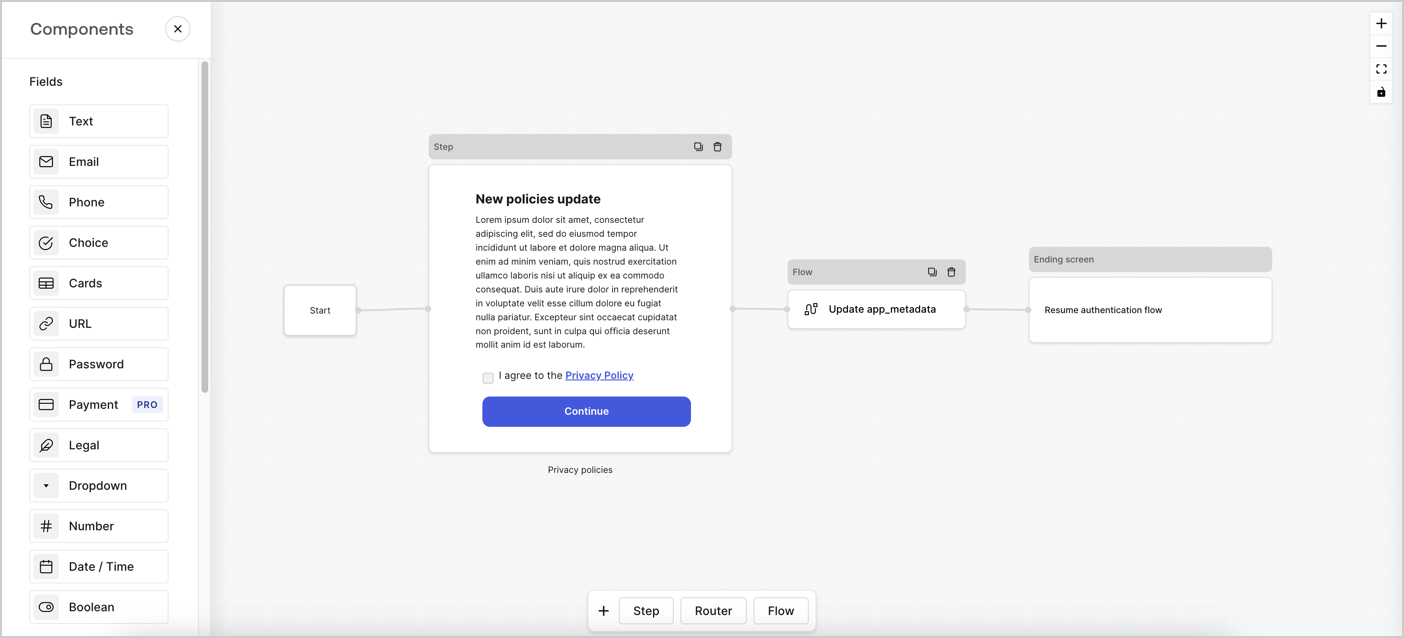
Forms for Actionsは、カスタムプライバシーポリシーフローを作成し、`app_metadata`オブジェクトの下に同意を保存できるようにします。
<Frame>
  <img src="https://mintcdn.com/docs-staging-feat-docs-5569-member-mgmt/vh5aCNZ2kpe3WBPr/docs/images/ja-jp/cdy7uua7fh8z/6i68dMvHDTijfRmSgN1x8Q/ad900e7d4c0fb34645921435472b8684/privavy-policy-form.png?fit=max&auto=format&n=vh5aCNZ2kpe3WBPr&q=85&s=06e96db32e10eb72008c16b37c42ad90" alt="Dashboard > Actions > Forms > Privacy policy use case" data-og-width="1404" width="1404" data-og-height="638" height="638" data-path="docs/images/ja-jp/cdy7uua7fh8z/6i68dMvHDTijfRmSgN1x8Q/ad900e7d4c0fb34645921435472b8684/privavy-policy-form.png" data-optimize="true" data-opv="3" srcset="https://mintcdn.com/docs-staging-feat-docs-5569-member-mgmt/vh5aCNZ2kpe3WBPr/docs/images/ja-jp/cdy7uua7fh8z/6i68dMvHDTijfRmSgN1x8Q/ad900e7d4c0fb34645921435472b8684/privavy-policy-form.png?w=280&fit=max&auto=format&n=vh5aCNZ2kpe3WBPr&q=85&s=f447e84f3ca4f548c3950038dc51cb6f 280w, https://mintcdn.com/docs-staging-feat-docs-5569-member-mgmt/vh5aCNZ2kpe3WBPr/docs/images/ja-jp/cdy7uua7fh8z/6i68dMvHDTijfRmSgN1x8Q/ad900e7d4c0fb34645921435472b8684/privavy-policy-form.png?w=560&fit=max&auto=format&n=vh5aCNZ2kpe3WBPr&q=85&s=7a5cf1be5325c6a3f26d772a9e0d51ba 560w, https://mintcdn.com/docs-staging-feat-docs-5569-member-mgmt/vh5aCNZ2kpe3WBPr/docs/images/ja-jp/cdy7uua7fh8z/6i68dMvHDTijfRmSgN1x8Q/ad900e7d4c0fb34645921435472b8684/privavy-policy-form.png?w=840&fit=max&auto=format&n=vh5aCNZ2kpe3WBPr&q=85&s=6ed3d686fc8f18bbfbea48c25330a69b 840w, https://mintcdn.com/docs-staging-feat-docs-5569-member-mgmt/vh5aCNZ2kpe3WBPr/docs/images/ja-jp/cdy7uua7fh8z/6i68dMvHDTijfRmSgN1x8Q/ad900e7d4c0fb34645921435472b8684/privavy-policy-form.png?w=1100&fit=max&auto=format&n=vh5aCNZ2kpe3WBPr&q=85&s=96ea207e553f669dc2f3639e5e3b7fc4 1100w, https://mintcdn.com/docs-staging-feat-docs-5569-member-mgmt/vh5aCNZ2kpe3WBPr/docs/images/ja-jp/cdy7uua7fh8z/6i68dMvHDTijfRmSgN1x8Q/ad900e7d4c0fb34645921435472b8684/privavy-policy-form.png?w=1650&fit=max&auto=format&n=vh5aCNZ2kpe3WBPr&q=85&s=7655f67edd3f9cd23e0f4116f20552fe 1650w, https://mintcdn.com/docs-staging-feat-docs-5569-member-mgmt/vh5aCNZ2kpe3WBPr/docs/images/ja-jp/cdy7uua7fh8z/6i68dMvHDTijfRmSgN1x8Q/ad900e7d4c0fb34645921435472b8684/privavy-policy-form.png?w=2500&fit=max&auto=format&n=vh5aCNZ2kpe3WBPr&q=85&s=1bd1332fa16091cc9ed24d9a28523d1a 2500w" />
</Frame>

以下のセクションでは、ノードとフローを使用して更新ポリシーフォームを作成する方法と、フォームを[ログイン後](/docs/ja-jp/customize/actions/explore-triggers/signup-and-login-triggers/login-trigger)のアクションに追加する手順について説明します。

## フォームをゼロから作成する

情報を収集するためのフォームを作成するには、次の手順に従ってください。

1. **［Auth0 Dashboard］>［Actions（アクション）］>［Forms（フォーム）］** の順に選択して、フォームエディターを開きます。
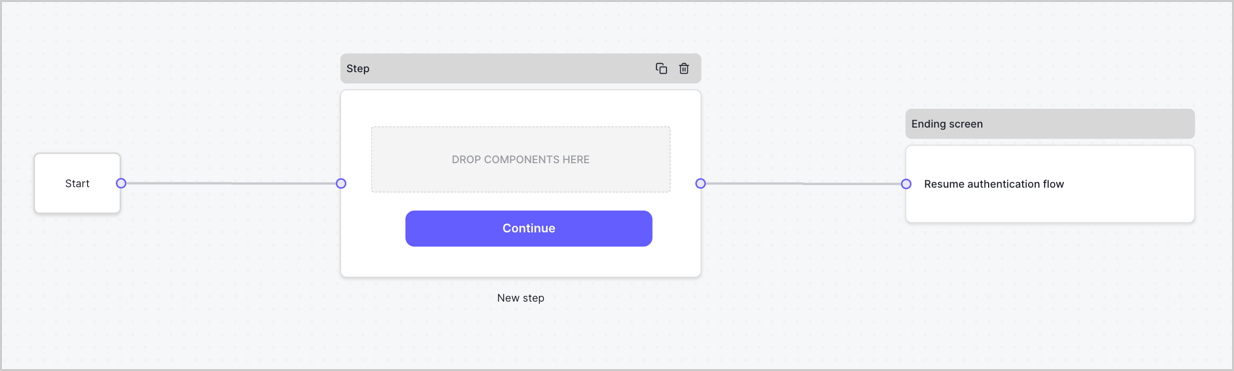
2. **［Create Form（フォームを作成）］** > **［Start from scratch（初めから作成する）］** の順に選択します。

特に設定を変更しない限り、新しいフォームには開始ノード、ステップノード、および終了スクリーンノードが含まれます。
<Frame>
  <img src="https://mintcdn.com/docs-staging-feat-docs-5569-member-mgmt/nooJ_hvpLM-VI0Ft/docs/images/ja-jp/cdy7uua7fh8z/2TZ9jSjgEcARFpULI6hz4R/a4319a1bd482f2ee5cc23100fdb2f42c/New-form-Forms-for-action-use-case.png?fit=max&auto=format&n=nooJ_hvpLM-VI0Ft&q=85&s=51440784b80ef5c7d1cd251e15af7682" alt="Dashboard > Forms > Use Cases > Form" data-og-width="1234" width="1234" data-og-height="371" height="371" data-path="docs/images/ja-jp/cdy7uua7fh8z/2TZ9jSjgEcARFpULI6hz4R/a4319a1bd482f2ee5cc23100fdb2f42c/New-form-Forms-for-action-use-case.png" data-optimize="true" data-opv="3" srcset="https://mintcdn.com/docs-staging-feat-docs-5569-member-mgmt/nooJ_hvpLM-VI0Ft/docs/images/ja-jp/cdy7uua7fh8z/2TZ9jSjgEcARFpULI6hz4R/a4319a1bd482f2ee5cc23100fdb2f42c/New-form-Forms-for-action-use-case.png?w=280&fit=max&auto=format&n=nooJ_hvpLM-VI0Ft&q=85&s=f98593df6a5717595e5733e8a664f874 280w, https://mintcdn.com/docs-staging-feat-docs-5569-member-mgmt/nooJ_hvpLM-VI0Ft/docs/images/ja-jp/cdy7uua7fh8z/2TZ9jSjgEcARFpULI6hz4R/a4319a1bd482f2ee5cc23100fdb2f42c/New-form-Forms-for-action-use-case.png?w=560&fit=max&auto=format&n=nooJ_hvpLM-VI0Ft&q=85&s=87c4e404127b34ceb5c0d1dbfcd21b18 560w, https://mintcdn.com/docs-staging-feat-docs-5569-member-mgmt/nooJ_hvpLM-VI0Ft/docs/images/ja-jp/cdy7uua7fh8z/2TZ9jSjgEcARFpULI6hz4R/a4319a1bd482f2ee5cc23100fdb2f42c/New-form-Forms-for-action-use-case.png?w=840&fit=max&auto=format&n=nooJ_hvpLM-VI0Ft&q=85&s=8bbd019f362b3af512b7d71fcf7f0dfc 840w, https://mintcdn.com/docs-staging-feat-docs-5569-member-mgmt/nooJ_hvpLM-VI0Ft/docs/images/ja-jp/cdy7uua7fh8z/2TZ9jSjgEcARFpULI6hz4R/a4319a1bd482f2ee5cc23100fdb2f42c/New-form-Forms-for-action-use-case.png?w=1100&fit=max&auto=format&n=nooJ_hvpLM-VI0Ft&q=85&s=89bc2eb59885c9f7d7abea2f689589c3 1100w, https://mintcdn.com/docs-staging-feat-docs-5569-member-mgmt/nooJ_hvpLM-VI0Ft/docs/images/ja-jp/cdy7uua7fh8z/2TZ9jSjgEcARFpULI6hz4R/a4319a1bd482f2ee5cc23100fdb2f42c/New-form-Forms-for-action-use-case.png?w=1650&fit=max&auto=format&n=nooJ_hvpLM-VI0Ft&q=85&s=c55dcdb36738db2ef820ff32cf3e3784 1650w, https://mintcdn.com/docs-staging-feat-docs-5569-member-mgmt/nooJ_hvpLM-VI0Ft/docs/images/ja-jp/cdy7uua7fh8z/2TZ9jSjgEcARFpULI6hz4R/a4319a1bd482f2ee5cc23100fdb2f42c/New-form-Forms-for-action-use-case.png?w=2500&fit=max&auto=format&n=nooJ_hvpLM-VI0Ft&q=85&s=367d7f87fe8b922b986337491962dd07 2500w" />
</Frame>

### ステップノードを構成する

ステップノードは、ユーザーに表示されるグラフィカルインターフェースです。次の手順に従って、ステップノードに[フィールド](/docs/ja-jp/customize/forms/nodes-and-components)を追加し、新しい同意の値を収集します。

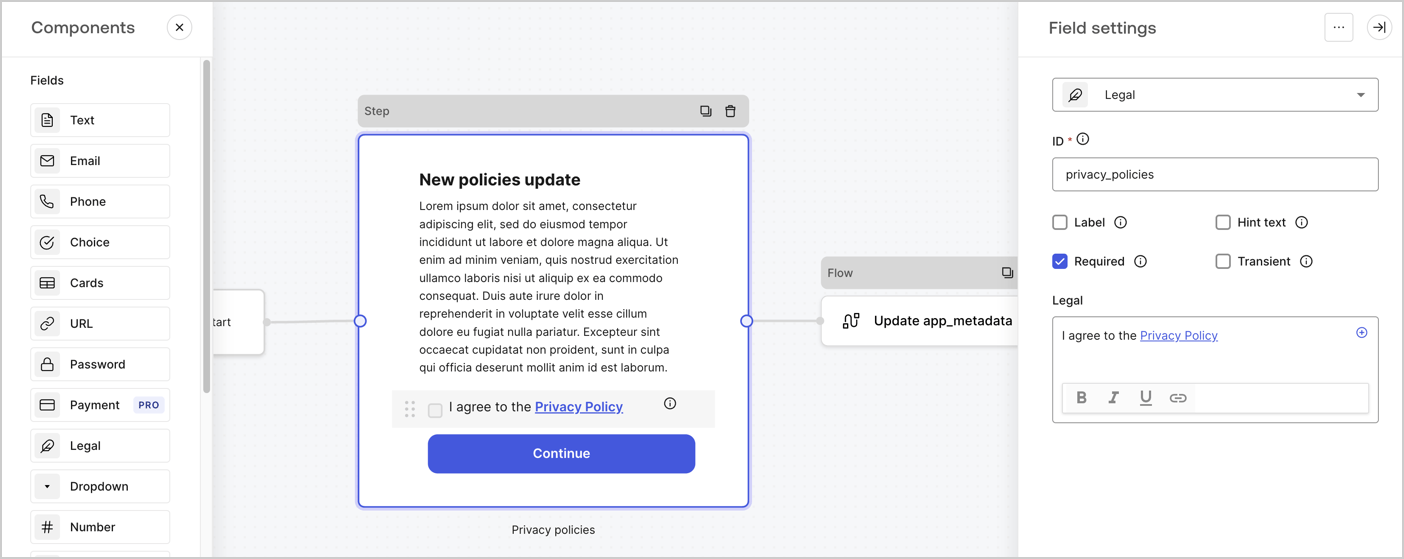
1. **［Components menu（コンポーネントメニュー）］** から **［Rich text（リッチテキスト）］** フィールドを **Step（ステップ）** ノードにドラッグします。

   * **Rich text（リッチテキスト）** ：プライバシーポリシー更新の説明を入力します。
   * **［Save（保存）］** を選択します。
2. **［Legal（法務）］** フィールドを **Step（ステップ）** ノードにドラッグします。

   * **Id** ：`privacy_policies`を入力します。
   * **Required（必要）** ：チェックボックスを有効にします。
   * **Legal（法的文）** ：「`I agree to the Privacy Policy`（プライバシーポリシーに同意します）」と入力します。
   * **［Save（保存）］** を選択します。
3. **［Publish（公開）］** を選択して保存します。

<Frame>
  <img src="https://mintcdn.com/docs-staging-feat-docs-5569-member-mgmt/GYZAKEscAMUCkJEc/docs/images/ja-jp/cdy7uua7fh8z/59zFFjQjAnjogkc2QGIqqJ/0ad66b1b636544122aa4e65968b76c2c/privacy-policy-step-node.png?fit=max&auto=format&n=GYZAKEscAMUCkJEc&q=85&s=1ba33b2c779a6539d3db7509ae9b407a" alt="Dashboard > Actions > Forms > Use case privacy policy step node" data-og-width="1404" width="1404" data-og-height="559" height="559" data-path="docs/images/ja-jp/cdy7uua7fh8z/59zFFjQjAnjogkc2QGIqqJ/0ad66b1b636544122aa4e65968b76c2c/privacy-policy-step-node.png" data-optimize="true" data-opv="3" srcset="https://mintcdn.com/docs-staging-feat-docs-5569-member-mgmt/GYZAKEscAMUCkJEc/docs/images/ja-jp/cdy7uua7fh8z/59zFFjQjAnjogkc2QGIqqJ/0ad66b1b636544122aa4e65968b76c2c/privacy-policy-step-node.png?w=280&fit=max&auto=format&n=GYZAKEscAMUCkJEc&q=85&s=18bac2f709f14c543045749c57c1503d 280w, https://mintcdn.com/docs-staging-feat-docs-5569-member-mgmt/GYZAKEscAMUCkJEc/docs/images/ja-jp/cdy7uua7fh8z/59zFFjQjAnjogkc2QGIqqJ/0ad66b1b636544122aa4e65968b76c2c/privacy-policy-step-node.png?w=560&fit=max&auto=format&n=GYZAKEscAMUCkJEc&q=85&s=eb67ee4501b652f5f34447827ee5f8d4 560w, https://mintcdn.com/docs-staging-feat-docs-5569-member-mgmt/GYZAKEscAMUCkJEc/docs/images/ja-jp/cdy7uua7fh8z/59zFFjQjAnjogkc2QGIqqJ/0ad66b1b636544122aa4e65968b76c2c/privacy-policy-step-node.png?w=840&fit=max&auto=format&n=GYZAKEscAMUCkJEc&q=85&s=ee2c6b20a2e08e7a2de6abcb64e1c466 840w, https://mintcdn.com/docs-staging-feat-docs-5569-member-mgmt/GYZAKEscAMUCkJEc/docs/images/ja-jp/cdy7uua7fh8z/59zFFjQjAnjogkc2QGIqqJ/0ad66b1b636544122aa4e65968b76c2c/privacy-policy-step-node.png?w=1100&fit=max&auto=format&n=GYZAKEscAMUCkJEc&q=85&s=06710dda9c6ec87af9234fd8e827dd88 1100w, https://mintcdn.com/docs-staging-feat-docs-5569-member-mgmt/GYZAKEscAMUCkJEc/docs/images/ja-jp/cdy7uua7fh8z/59zFFjQjAnjogkc2QGIqqJ/0ad66b1b636544122aa4e65968b76c2c/privacy-policy-step-node.png?w=1650&fit=max&auto=format&n=GYZAKEscAMUCkJEc&q=85&s=ce94348be9b546a9108f8f46c9eea7eb 1650w, https://mintcdn.com/docs-staging-feat-docs-5569-member-mgmt/GYZAKEscAMUCkJEc/docs/images/ja-jp/cdy7uua7fh8z/59zFFjQjAnjogkc2QGIqqJ/0ad66b1b636544122aa4e65968b76c2c/privacy-policy-step-node.png?w=2500&fit=max&auto=format&n=GYZAKEscAMUCkJEc&q=85&s=73c5c21f82c69d9b0944bb59e96ca92f 2500w" />
</Frame>

### フローノードを構成する

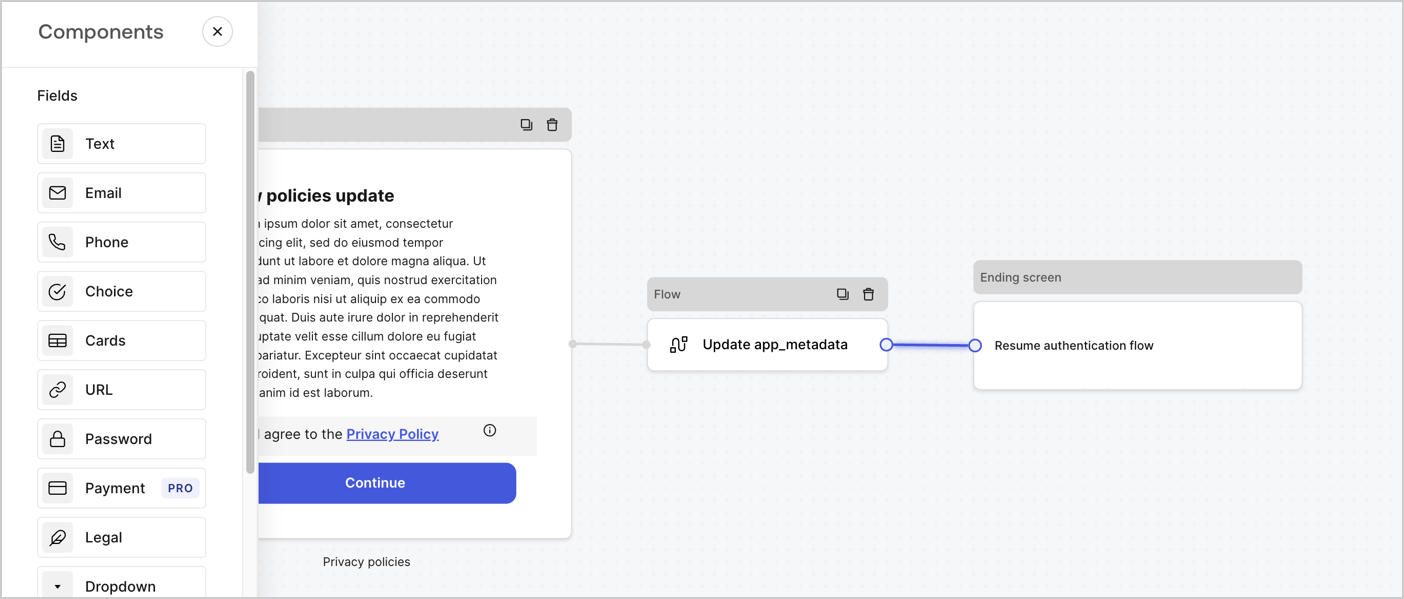
次の手順に従って、 **Step（ステップ）** ノードの後に **Flow（フロー）** ノードを追加し、`app_metadata`を更新して認証フローを再開します。

1. フォームエディターの下にある **［Flow（フロー）］** を選択します。
2. **Step（ステップ）** ノードと **Ending Screen（終了画面）** ノードの間にある既存のリンクを削除します。
3. 新たに **［Flow（フロー）］** > **［Click to add a flow（クリックしてフローを追加する）］** > **［Create a new flow（新しいフローを作成する）］** を選択します。

   * **［Name（名前）］** フィールドに`Update app_metadata`と入力します。
   * **［Create（作成）］** を選択します。
   * **［Save（保存）］** を選択します。
4. 下の画像のように **Flow（フロー）ノード** を **Step（ステップ）** ノードと **Ending Screen（終了画面）** ノードにリンクします。
5. **［Publish（公開）］** を選択して保存します。

<Frame>
  <img src="https://mintcdn.com/docs-staging-feat-docs-5569-member-mgmt/vh5aCNZ2kpe3WBPr/docs/images/ja-jp/cdy7uua7fh8z/6YIkzm7SrpM9LW76AXuRzh/353c518fe82bbaa440836da1d83596d6/link-policies.png?fit=max&auto=format&n=vh5aCNZ2kpe3WBPr&q=85&s=2db10749db3f8d9f56e9c19837846424" alt="Dashboard > Actions > Forms > Form" data-og-width="1404" width="1404" data-og-height="599" height="599" data-path="docs/images/ja-jp/cdy7uua7fh8z/6YIkzm7SrpM9LW76AXuRzh/353c518fe82bbaa440836da1d83596d6/link-policies.png" data-optimize="true" data-opv="3" srcset="https://mintcdn.com/docs-staging-feat-docs-5569-member-mgmt/vh5aCNZ2kpe3WBPr/docs/images/ja-jp/cdy7uua7fh8z/6YIkzm7SrpM9LW76AXuRzh/353c518fe82bbaa440836da1d83596d6/link-policies.png?w=280&fit=max&auto=format&n=vh5aCNZ2kpe3WBPr&q=85&s=5b93839825cab63d758938bfccd546b0 280w, https://mintcdn.com/docs-staging-feat-docs-5569-member-mgmt/vh5aCNZ2kpe3WBPr/docs/images/ja-jp/cdy7uua7fh8z/6YIkzm7SrpM9LW76AXuRzh/353c518fe82bbaa440836da1d83596d6/link-policies.png?w=560&fit=max&auto=format&n=vh5aCNZ2kpe3WBPr&q=85&s=f03bef838b4fa90eca8a5ee2e6938e59 560w, https://mintcdn.com/docs-staging-feat-docs-5569-member-mgmt/vh5aCNZ2kpe3WBPr/docs/images/ja-jp/cdy7uua7fh8z/6YIkzm7SrpM9LW76AXuRzh/353c518fe82bbaa440836da1d83596d6/link-policies.png?w=840&fit=max&auto=format&n=vh5aCNZ2kpe3WBPr&q=85&s=e9fa638e04c91545bb40fb1fc801f876 840w, https://mintcdn.com/docs-staging-feat-docs-5569-member-mgmt/vh5aCNZ2kpe3WBPr/docs/images/ja-jp/cdy7uua7fh8z/6YIkzm7SrpM9LW76AXuRzh/353c518fe82bbaa440836da1d83596d6/link-policies.png?w=1100&fit=max&auto=format&n=vh5aCNZ2kpe3WBPr&q=85&s=56b49a1c0c2d5fae4cb48b7ad635a3f0 1100w, https://mintcdn.com/docs-staging-feat-docs-5569-member-mgmt/vh5aCNZ2kpe3WBPr/docs/images/ja-jp/cdy7uua7fh8z/6YIkzm7SrpM9LW76AXuRzh/353c518fe82bbaa440836da1d83596d6/link-policies.png?w=1650&fit=max&auto=format&n=vh5aCNZ2kpe3WBPr&q=85&s=dd1fe4c3313df2c0e1dbe5e458a4d5c9 1650w, https://mintcdn.com/docs-staging-feat-docs-5569-member-mgmt/vh5aCNZ2kpe3WBPr/docs/images/ja-jp/cdy7uua7fh8z/6YIkzm7SrpM9LW76AXuRzh/353c518fe82bbaa440836da1d83596d6/link-policies.png?w=2500&fit=max&auto=format&n=vh5aCNZ2kpe3WBPr&q=85&s=c39501fdd69f6d86317ecd29d4abc59c 2500w" />
</Frame>

Auth0ユーザーの更新アクションをフローに追加するには、次の手順に従います。

1. **［Update user\_metadata（user\_metadata更新）］* \*\*\* フロー*\* を選択してから **［Edit flow（フローの編集）］** を選択し、新しいタブにフローエディターを開きます。
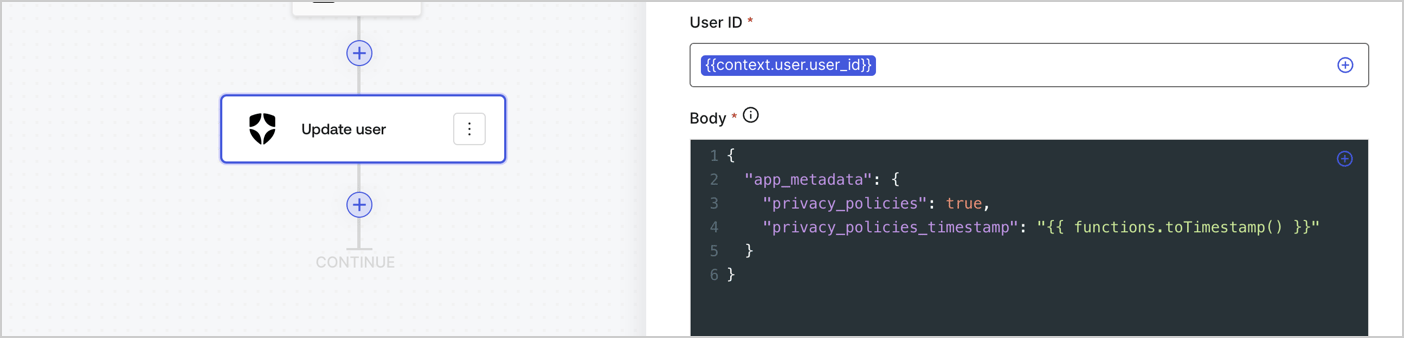
2. アクションの **［Start（開始）］** の下にある **［+］** アイコンを選択し、 **Update user（ユーザー更新）** アクションを追加します。以下のフィールドに入力して、 **［Save（保存）］** を選択します。

   * **Connection（接続）** ：ドロップダウンからM2MアプリケーションへのVault接続を選択します。

   * **User ID（ユーザーID）** ：`{{context.user.user_id}}`と入力します。

   * **Body（ボディー）** ：以下のコードをコピーして貼り付け、privacy\_policiesとprivacy\_policies\_timestampのプロパティを含むapp\_metadataを更新します。

     ```text lines theme={null}
     {
       "app_metadata": {
         "privacy_policies": true,
         "privacy_policies_timestamp": "{{ functions.toTimestamp() }}"
       }
     }
     ```

   * **［Save（保存）］** を選択します。
3. **［Publish（公開）］** を選択して保存します。

<Frame>
  <img src="https://mintcdn.com/docs-staging-feat-docs-5569-member-mgmt/6D5oDCSbrDnDklQu/docs/images/ja-jp/cdy7uua7fh8z/CvMNIwWrOUwaFW4X3G28p/1fb70ae57a20749d9ffaaba8dc0b7e26/update-user-privacy.png?fit=max&auto=format&n=6D5oDCSbrDnDklQu&q=85&s=aa8d33cfb4538e08f5c7e5fcd1cd47ce" alt="Dashboard > Actions > Forms > User case privacy policy code" data-og-width="1404" width="1404" data-og-height="338" height="338" data-path="docs/images/ja-jp/cdy7uua7fh8z/CvMNIwWrOUwaFW4X3G28p/1fb70ae57a20749d9ffaaba8dc0b7e26/update-user-privacy.png" data-optimize="true" data-opv="3" srcset="https://mintcdn.com/docs-staging-feat-docs-5569-member-mgmt/6D5oDCSbrDnDklQu/docs/images/ja-jp/cdy7uua7fh8z/CvMNIwWrOUwaFW4X3G28p/1fb70ae57a20749d9ffaaba8dc0b7e26/update-user-privacy.png?w=280&fit=max&auto=format&n=6D5oDCSbrDnDklQu&q=85&s=9deefd9108b541921f863e444fc019ae 280w, https://mintcdn.com/docs-staging-feat-docs-5569-member-mgmt/6D5oDCSbrDnDklQu/docs/images/ja-jp/cdy7uua7fh8z/CvMNIwWrOUwaFW4X3G28p/1fb70ae57a20749d9ffaaba8dc0b7e26/update-user-privacy.png?w=560&fit=max&auto=format&n=6D5oDCSbrDnDklQu&q=85&s=d922d51d71c3d9396e65b6e6997f2035 560w, https://mintcdn.com/docs-staging-feat-docs-5569-member-mgmt/6D5oDCSbrDnDklQu/docs/images/ja-jp/cdy7uua7fh8z/CvMNIwWrOUwaFW4X3G28p/1fb70ae57a20749d9ffaaba8dc0b7e26/update-user-privacy.png?w=840&fit=max&auto=format&n=6D5oDCSbrDnDklQu&q=85&s=189d609335229cd0a0caf2e758efa926 840w, https://mintcdn.com/docs-staging-feat-docs-5569-member-mgmt/6D5oDCSbrDnDklQu/docs/images/ja-jp/cdy7uua7fh8z/CvMNIwWrOUwaFW4X3G28p/1fb70ae57a20749d9ffaaba8dc0b7e26/update-user-privacy.png?w=1100&fit=max&auto=format&n=6D5oDCSbrDnDklQu&q=85&s=34ac918da32ac3fe7299c90cadba6c8b 1100w, https://mintcdn.com/docs-staging-feat-docs-5569-member-mgmt/6D5oDCSbrDnDklQu/docs/images/ja-jp/cdy7uua7fh8z/CvMNIwWrOUwaFW4X3G28p/1fb70ae57a20749d9ffaaba8dc0b7e26/update-user-privacy.png?w=1650&fit=max&auto=format&n=6D5oDCSbrDnDklQu&q=85&s=203080a99b8744a38240ce21b595e189 1650w, https://mintcdn.com/docs-staging-feat-docs-5569-member-mgmt/6D5oDCSbrDnDklQu/docs/images/ja-jp/cdy7uua7fh8z/CvMNIwWrOUwaFW4X3G28p/1fb70ae57a20749d9ffaaba8dc0b7e26/update-user-privacy.png?w=2500&fit=max&auto=format&n=6D5oDCSbrDnDklQu&q=85&s=8d05381d491e4d2a171780fd7ee73942 2500w" />
</Frame>

<Callout icon="file-lines" color="#0EA5E9" iconType="regular">
  **Update app\_metadata** フローは、`privacy_policies true`値を`app_metadata`オブジェクトに追加し、[ヘルパー関数](/docs/ja-jp/customize/forms/variables)を使ってタイムスタンプを生成します。
</Callout>

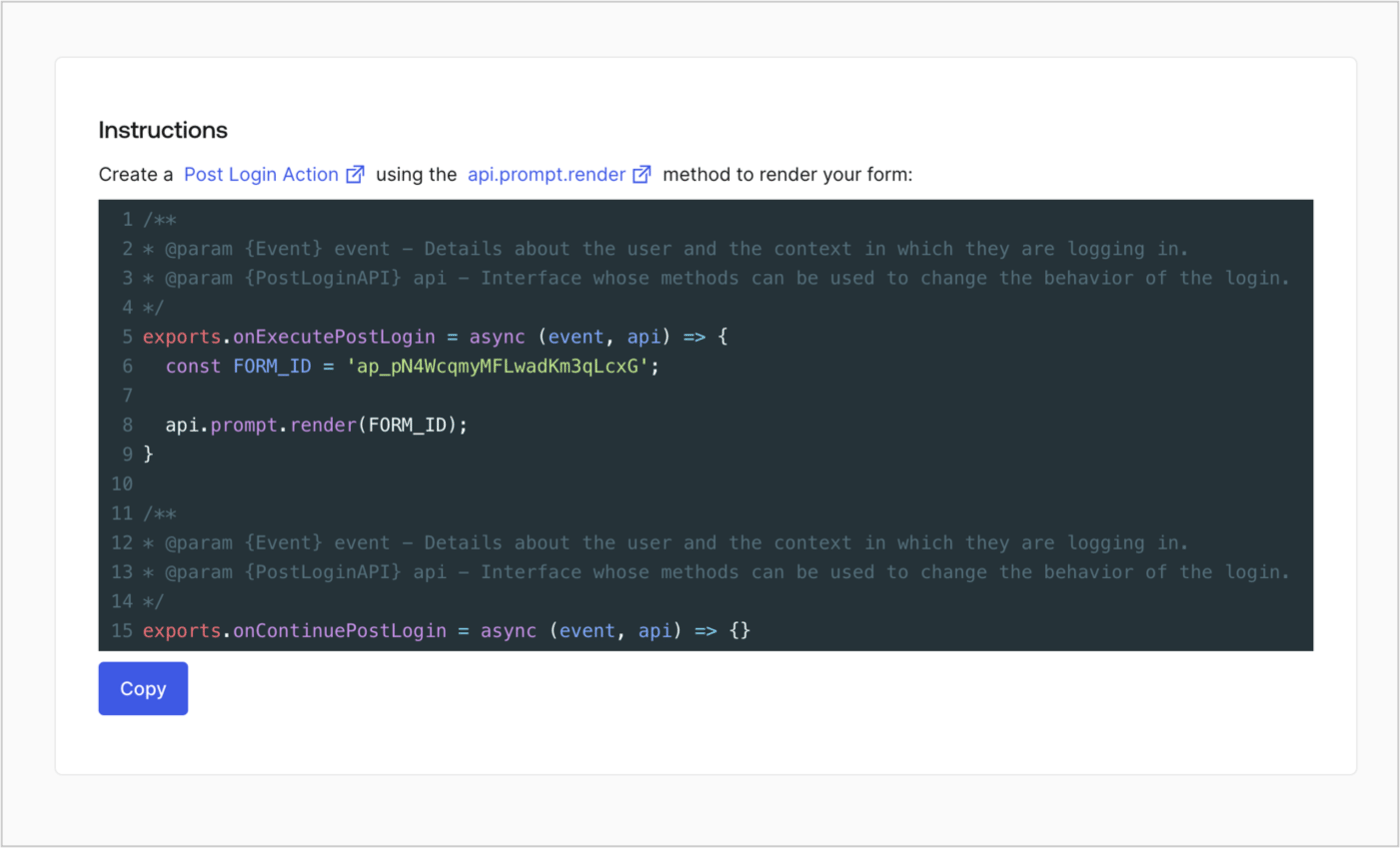
## フォームのレンダーコードを取得する

フォームのレンダーコードを取得して、カスタムのログイン後アクションでフォームを視覚的にレンダリングするには、以下の手順に従います。

* フォームエディターから **`<>`［Render（レンダー）］** を選択します。
* **［Copy（コピー）］** を選択します。

<Frame>
  <img src="https://mintcdn.com/docs-staging-feat-docs-5569-member-mgmt/-kILYX5qFC_2_UXb/docs/images/ja-jp/cdy7uua7fh8z/2EIUzc539sq9lwoTKbjoJv/496a864c0fc44a782c9cadca119dbfb0/embed.png?fit=max&auto=format&n=-kILYX5qFC_2_UXb&q=85&s=8000f49a3441dd30b0da962272786532" alt="Dashboard > Actions > Forms > Form > Embed" data-og-width="1400" width="1400" data-og-height="848" height="848" data-path="docs/images/ja-jp/cdy7uua7fh8z/2EIUzc539sq9lwoTKbjoJv/496a864c0fc44a782c9cadca119dbfb0/embed.png" data-optimize="true" data-opv="3" srcset="https://mintcdn.com/docs-staging-feat-docs-5569-member-mgmt/-kILYX5qFC_2_UXb/docs/images/ja-jp/cdy7uua7fh8z/2EIUzc539sq9lwoTKbjoJv/496a864c0fc44a782c9cadca119dbfb0/embed.png?w=280&fit=max&auto=format&n=-kILYX5qFC_2_UXb&q=85&s=def461153f54fa79523f789530a85a74 280w, https://mintcdn.com/docs-staging-feat-docs-5569-member-mgmt/-kILYX5qFC_2_UXb/docs/images/ja-jp/cdy7uua7fh8z/2EIUzc539sq9lwoTKbjoJv/496a864c0fc44a782c9cadca119dbfb0/embed.png?w=560&fit=max&auto=format&n=-kILYX5qFC_2_UXb&q=85&s=7d5b64b6752cfd4520f1628b6993c287 560w, https://mintcdn.com/docs-staging-feat-docs-5569-member-mgmt/-kILYX5qFC_2_UXb/docs/images/ja-jp/cdy7uua7fh8z/2EIUzc539sq9lwoTKbjoJv/496a864c0fc44a782c9cadca119dbfb0/embed.png?w=840&fit=max&auto=format&n=-kILYX5qFC_2_UXb&q=85&s=e1991146bff24e0ce5f6cc11215cc865 840w, https://mintcdn.com/docs-staging-feat-docs-5569-member-mgmt/-kILYX5qFC_2_UXb/docs/images/ja-jp/cdy7uua7fh8z/2EIUzc539sq9lwoTKbjoJv/496a864c0fc44a782c9cadca119dbfb0/embed.png?w=1100&fit=max&auto=format&n=-kILYX5qFC_2_UXb&q=85&s=2d8525a9259597bb420485bb297dfad0 1100w, https://mintcdn.com/docs-staging-feat-docs-5569-member-mgmt/-kILYX5qFC_2_UXb/docs/images/ja-jp/cdy7uua7fh8z/2EIUzc539sq9lwoTKbjoJv/496a864c0fc44a782c9cadca119dbfb0/embed.png?w=1650&fit=max&auto=format&n=-kILYX5qFC_2_UXb&q=85&s=e2309a1c6af867e1511a0897eb702f1a 1650w, https://mintcdn.com/docs-staging-feat-docs-5569-member-mgmt/-kILYX5qFC_2_UXb/docs/images/ja-jp/cdy7uua7fh8z/2EIUzc539sq9lwoTKbjoJv/496a864c0fc44a782c9cadca119dbfb0/embed.png?w=2500&fit=max&auto=format&n=-kILYX5qFC_2_UXb&q=85&s=a0486c0a4f01a599e6793a3f98fe8d2a 2500w" />
</Frame>

## ログイン後のアクションを作成する

ログイン後のアクションを作成してフォームをレンダリングするには、次の手順に従います。

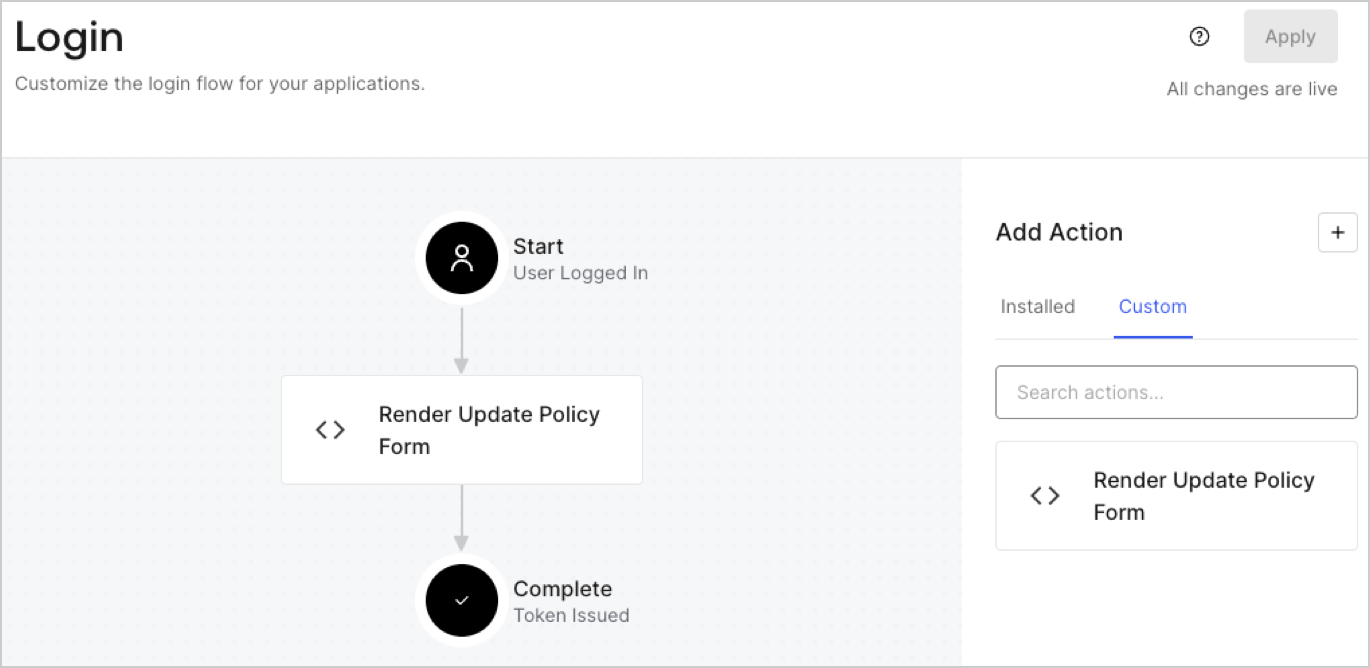
1. **［Auth0 Dashboard］>［Actions（アクション）］>［Flows（フロー）］>［Login（ログイン）］** に移動します。
2. **［+］** アイコンを選択し、 **［Build from scratch（初めから構築する）］** を選択します。

   * **Name（名前）** ：`Render Update Policy Form`（更新ポリシーフォームのレンダリング）と入力します。
   * **Trigger（トリガー）** ：［`Login / Post Login`（ログイン/ログイン後）］を選択します。
   * **Runtime（ランタイム）** ：推奨バージョンを選択します。
3. **［Create（作成）］** を選択します。

ログイン後のアクションを構成するには、以下を行います。

1. 既存のコードをコードエディターから削除します。

2. フォームのレンダリングコードをコードエディターに貼り付けます。

3. コードを編集して、フォームをレンダリングする条件ロジックを定義します。

   ```javascript lines theme={null}
   /**
   * @param {Event} event - Details about the user and the context in which they are logging in.
   * @param {PostLoginAPI} api - Interface whose methods can be used to change the behavior of the login.
   */
   exports.onExecutePostLogin = async (event, api) => {
     const FORM_ID = 'REPLACE_WITH_YOUR_FORM_ID';

     if (event.user.app_metadata.privacy_policies !== true) {
       api.prompt.render(FORM_ID);
     }
   }

   exports.onContinuePostLogin = async (event, api) => { }
   ```

   <Callout icon="file-lines" color="#0EA5E9" iconType="regular">
     上の例にあるコードでは、ユーザーのアプリメタデータに`privacy_policies`プロパティがない場合にフォームが表示されます。
   </Callout>

4. **［Deploy（デプロイ）］** を選択します。

5. **［Render Update Policy Form（更新ポリシーフォームのレンダリング）］** アクションを **Login（ログイン）** フローにドラッグ＆ドロップします。

   <Frame>
     <img src="https://mintcdn.com/docs-staging-feat-docs-5569-member-mgmt/8ya5u7bLdSC00LoT/docs/images/ja-jp/cdy7uua7fh8z/5TOwDgevZsBqd7yZynUYWU/41ca909dc3007aed4f40ff794a05efa5/postlogin.png?fit=max&auto=format&n=8ya5u7bLdSC00LoT&q=85&s=ef1a09b09146f361cc38ecfcdd3121a5" alt="Dashboard > Forms > Use Case > Render update policy form login action" data-og-width="1370" width="1370" data-og-height="668" height="668" data-path="docs/images/ja-jp/cdy7uua7fh8z/5TOwDgevZsBqd7yZynUYWU/41ca909dc3007aed4f40ff794a05efa5/postlogin.png" data-optimize="true" data-opv="3" srcset="https://mintcdn.com/docs-staging-feat-docs-5569-member-mgmt/8ya5u7bLdSC00LoT/docs/images/ja-jp/cdy7uua7fh8z/5TOwDgevZsBqd7yZynUYWU/41ca909dc3007aed4f40ff794a05efa5/postlogin.png?w=280&fit=max&auto=format&n=8ya5u7bLdSC00LoT&q=85&s=edeab535b216c3bc6a0b9e9fb3eca017 280w, https://mintcdn.com/docs-staging-feat-docs-5569-member-mgmt/8ya5u7bLdSC00LoT/docs/images/ja-jp/cdy7uua7fh8z/5TOwDgevZsBqd7yZynUYWU/41ca909dc3007aed4f40ff794a05efa5/postlogin.png?w=560&fit=max&auto=format&n=8ya5u7bLdSC00LoT&q=85&s=387c277ddfe0cb250d876cba5ac54987 560w, https://mintcdn.com/docs-staging-feat-docs-5569-member-mgmt/8ya5u7bLdSC00LoT/docs/images/ja-jp/cdy7uua7fh8z/5TOwDgevZsBqd7yZynUYWU/41ca909dc3007aed4f40ff794a05efa5/postlogin.png?w=840&fit=max&auto=format&n=8ya5u7bLdSC00LoT&q=85&s=b8d281dba960e5cdcd6d520d65ded220 840w, https://mintcdn.com/docs-staging-feat-docs-5569-member-mgmt/8ya5u7bLdSC00LoT/docs/images/ja-jp/cdy7uua7fh8z/5TOwDgevZsBqd7yZynUYWU/41ca909dc3007aed4f40ff794a05efa5/postlogin.png?w=1100&fit=max&auto=format&n=8ya5u7bLdSC00LoT&q=85&s=0fd7593f9ba701395cfc7451f3cfa88c 1100w, https://mintcdn.com/docs-staging-feat-docs-5569-member-mgmt/8ya5u7bLdSC00LoT/docs/images/ja-jp/cdy7uua7fh8z/5TOwDgevZsBqd7yZynUYWU/41ca909dc3007aed4f40ff794a05efa5/postlogin.png?w=1650&fit=max&auto=format&n=8ya5u7bLdSC00LoT&q=85&s=b4c003a95c2c5aefbb2d7ba7720cfc83 1650w, https://mintcdn.com/docs-staging-feat-docs-5569-member-mgmt/8ya5u7bLdSC00LoT/docs/images/ja-jp/cdy7uua7fh8z/5TOwDgevZsBqd7yZynUYWU/41ca909dc3007aed4f40ff794a05efa5/postlogin.png?w=2500&fit=max&auto=format&n=8ya5u7bLdSC00LoT&q=85&s=380079516614f0555df49869867438a7 2500w" />
   </Frame>

6. **［Apply（適用）］** を選択します。

### 実装をテストする

次の手順に従って実装をテストします。

1. `app_metadata`属性の`privacy_policies`に値がない既存のユーザーとしてログインします。
2. ログインフローのログイン後アクションがフォームをレンダリングして、同意を求めます。
3. **［Auth0 Dashboard］>［User Management（ユーザー管理）］>［Users（ユーザー）］** に移動し、ユーザーを見つけて、`app_metadata`属性の`privacy_policies`に`true`値とタイムスタンプが含まれていることを確認します。